Clipping. Detail. Character.JAC Audio / DClip

DClip

Control peaks.
Preserve detail.
Add character.

Multiband clipping and saturation, with three distinct modes. Control the peaks. Preserve the detail. Push the character.

$49.99 at launch · not yet for sale

Coming soon. No purchases or downloads available yet.

DClip plugin interface in DClip mode

Multiband interfaces rendered from a pre-release build.
The released version may look slightly different.

View interface
Three modesDClip · Spectral · Color
Up to four bandsDraggable crossovers. Per-band control.
Mono & stereoLeft/right and mid/side processing.
VST3 & CLAPPlanned formats. View requirements below.

Meet the three modes

Soft clipping.
Spectral detail.
Analog-style saturation.

A soft-knee clipper. Spectral detail preservation. Five styles of analog-inspired saturation. Choose one mode per instance, with the same multiband workflow throughout.

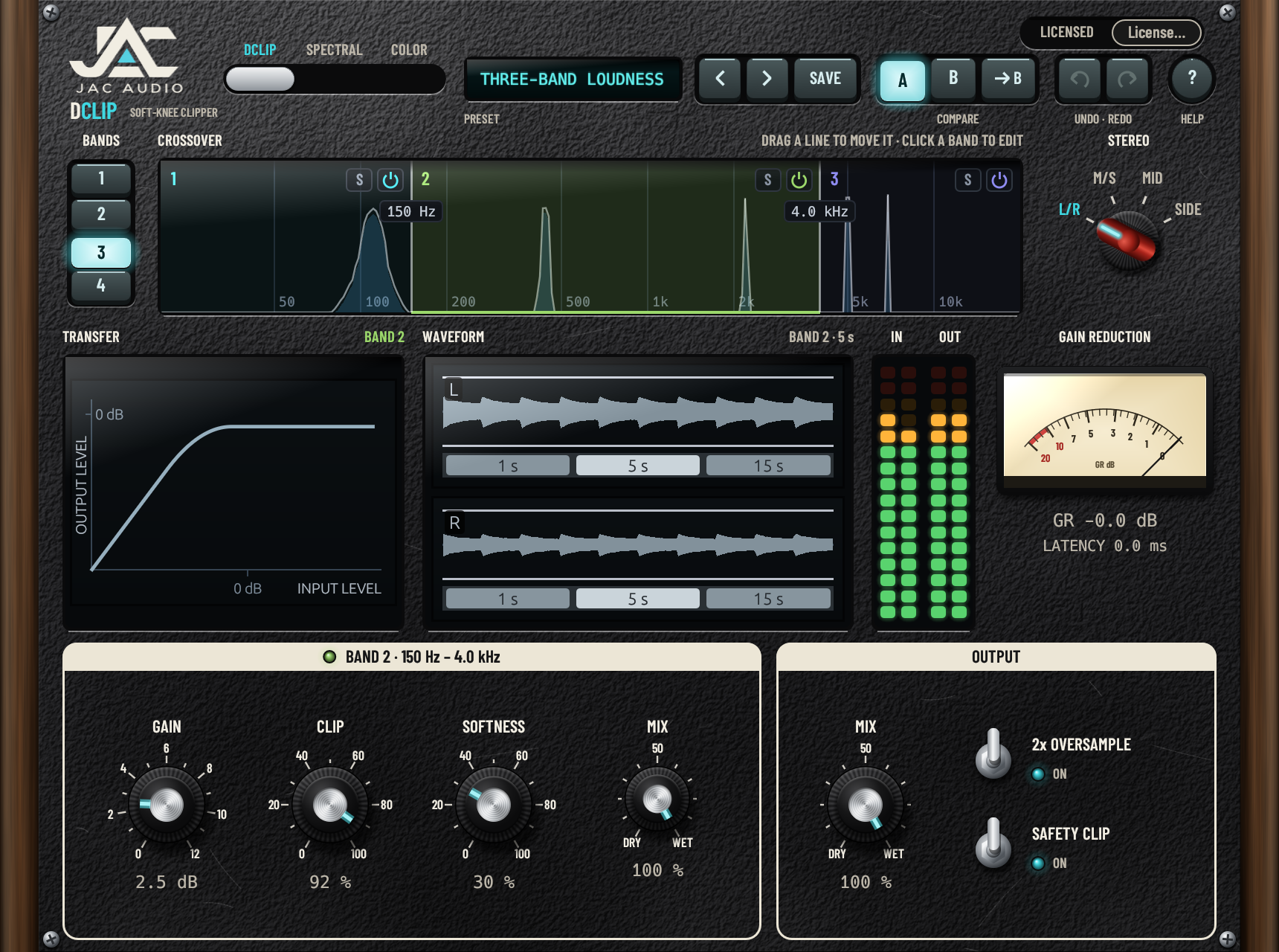
Actual DClip editor test render showing DClip mode and its band controls

DClip / Three-band loudness · 150 Hz and 4.0 kHz crossovers

01 / Soft-knee clipping

Shape the peaks.
Keep control.

A soft-knee clipper with stepped Gain, Clip and Softness controls. Dial in each band, blend with Band Mix, and switch on optional 2× oversampling.

0 samples reported to the host*

Per-band controls

Gain: 0–12 dB in 0.1 dB steps
Clip: 0–100% · Softness: 0–100% · Band Mix

Across all bands

2× Oversample · Safety Clip · Mix
Plus shared band, crossover and stereo controls.

* With 2× Oversample enabled, its filters introduce approximately 2 samples of delay (0.04 ms at 48 kHz), which the host does not compensate for. Mix stays aligned inside the plugin.
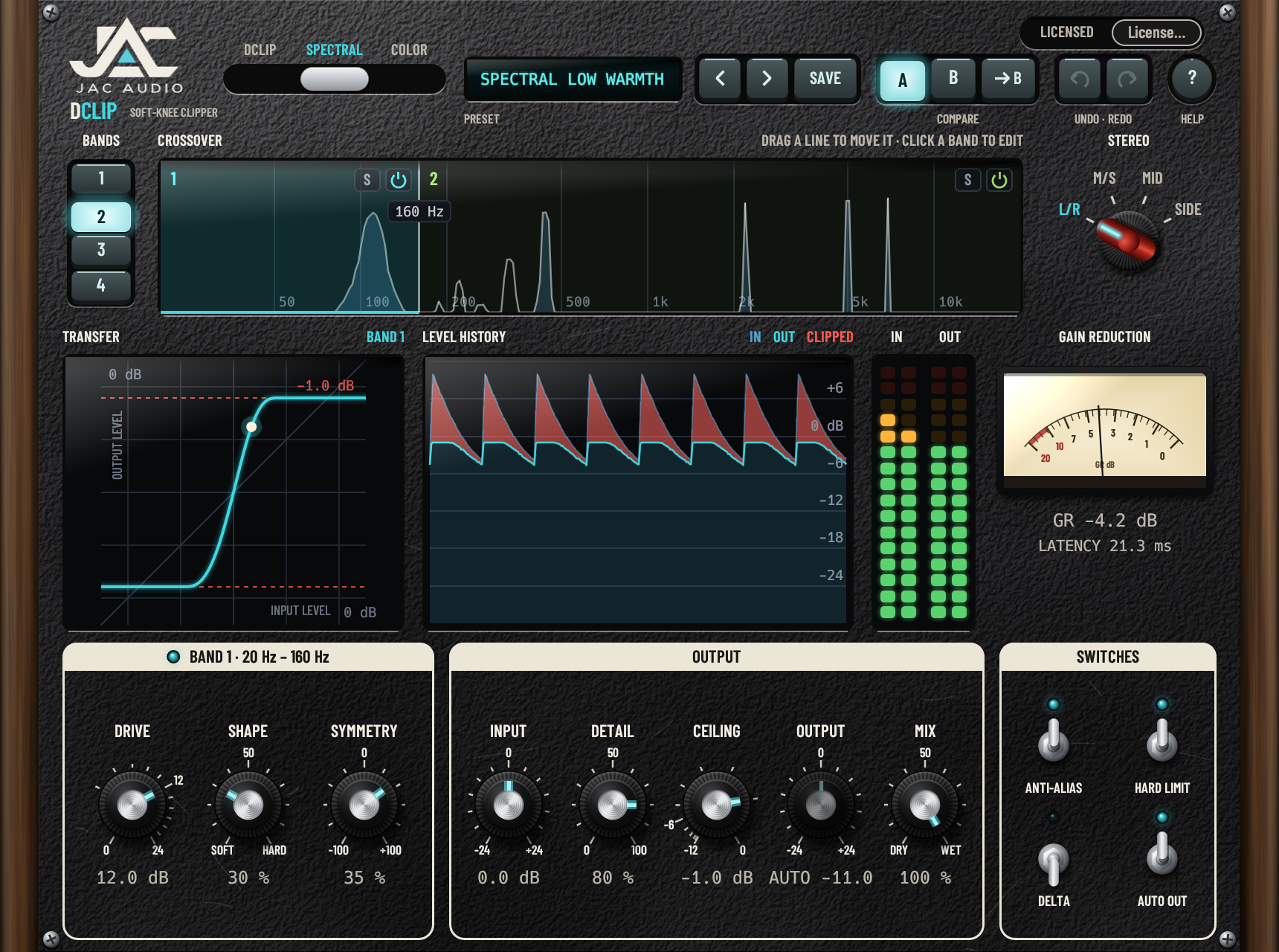
Actual DClip editor test render showing Spectral mode

Spectral / Low warmth · 160 Hz crossover

02 / Clipping with detail preservation

Push the signal.
Bring back the detail.

Smooth-knee clipping with a ceiling and per-polarity shaping. Detail preservation gives back quiet content removed by clipping, alongside anti-aliasing and automatic output level compensation.

1024 samples at 44.1 & 48 kHz

Per-band controls

Drive: 0–24 dB · Shape · Symmetry
Plus shared band, crossover and stereo controls.

Across all bands

Input · Detail · Ceiling · Output · Mix
Anti-Alias · Hard Limit · Delta · Auto Output

Reported latency is 23.2 ms at 44.1 kHz and 21.3 ms at 48 kHz. Auto Output uses fixed compensation based on the settings, not an audio measurement: match levels when comparing before and after.

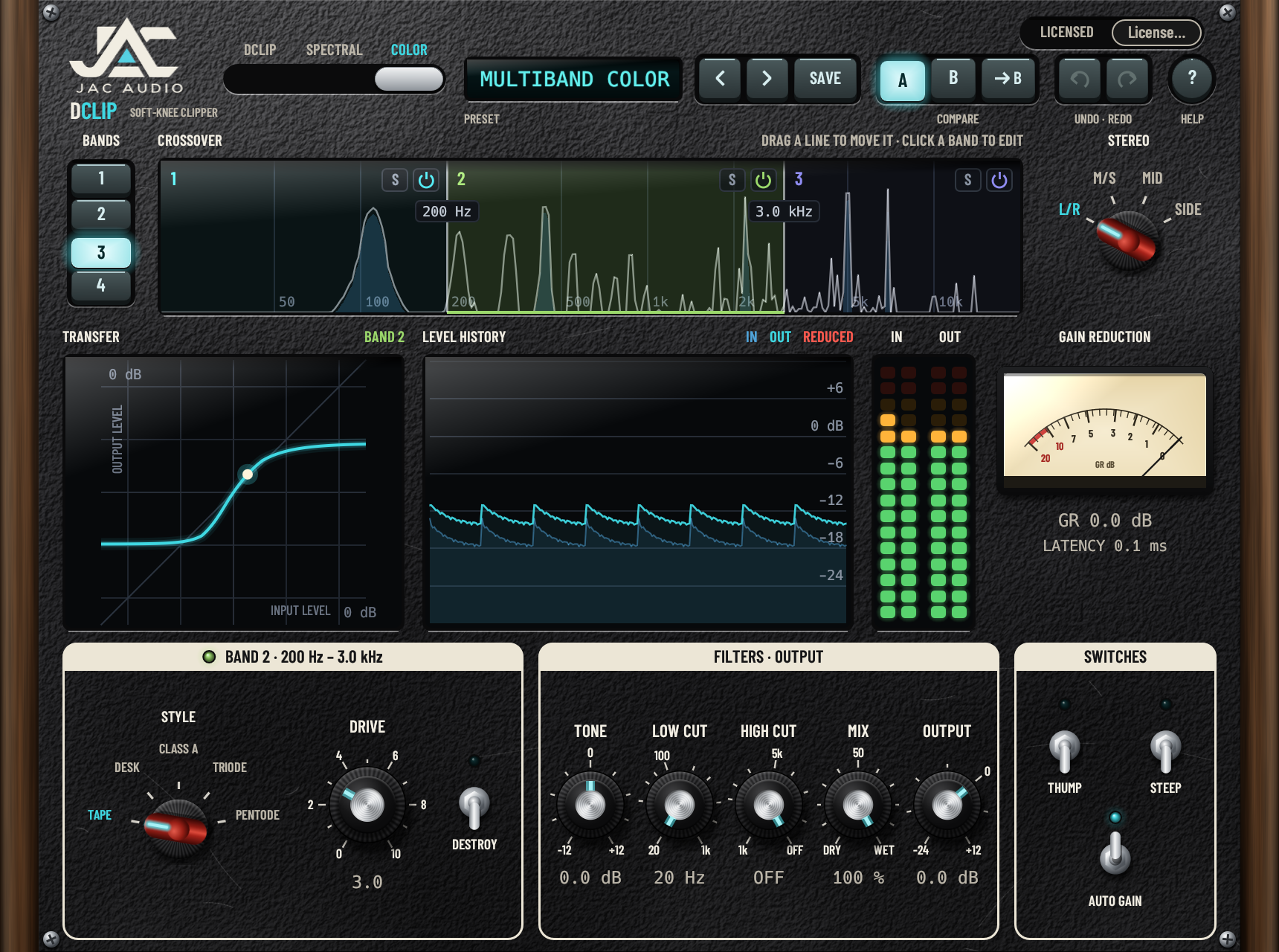
Actual DClip editor test render showing Color mode and saturation styles

Color / Three-band color · 200 Hz and 3.0 kHz crossovers

03 / Analog-style saturation

Give every band
its own character.

Five saturation styles, each with its own EQ, asymmetric curve and level-dependent dynamics. Choose a style per band, then shape the result with global tone and filter controls.

TapeDeskClass ATriodePentode

5 samples · approximately 0.1 ms at 48 kHz

Per-band controls

Style · Drive: 0–10 · Destroy
Plus shared band, crossover and stereo controls.

Across all bands

Tone: ±12 dB · Low Cut: 20 Hz–1 kHz
High Cut: 1–20 kHz (off at the top) · Mix
Output: −24 to +12 dB · Thump · Steep · Auto Gain

Auto Gain uses fixed compensation based on the settings, not an audio measurement. At high Drive, Desk, Triode and Pentode can produce a brief “choke” after loud passages; this is part of their documented behavior.

The same workflow. Every mode.

Shape your sound across four frequency bands.

Go full-band or get specific. The shared band system gives you the same focused controls, whichever mode you choose.

  1. One to four bands

    Drag crossovers on the spectrum display. Solo a band to hear what you’re working on, or switch individual bands on and off.

  2. Choose your stereo view

    Process left/right, mid/side, mid only or side only. DClip supports both mono and stereo tracks.

  3. A mix that stays aligned

    The dry side of Mix goes through the same filters as the processed side, keeping the blend aligned without comb filtering.

  4. Explore. Compare. Go back.

    Factory and user presets, A/B comparison, undo and redo, and help are all accessible from the plugin header.

Know the details

Built for your setup?

DClip is coming to macOS first. These are the planned requirements; we’ll confirm them, and list the tested hosts, before release.

Planned requirementsmacOS
Coming first
Windows
Planned, not yet available
Operating systemmacOS 11 Big Sur or later
Tested so far on macOS 26
Windows 10 or 11, 64-bit
ProcessorApple Silicon
Intel with AVX2 and FMA planned, not yet tested
Intel or AMD with AVX2 and FMA
Plugin formatsVST3 & CLAP
VST3 tested so far; CLAP not yet tested
VST3 & CLAP
64-bit
HostA 64-bit host that loads VST3 or CLAPA 64-bit host that loads VST3 or CLAP

Not available as Audio Unit or AAX. Logic Pro, GarageBand and Pro Tools are not supported by these formats. Linux and Windows on Arm are not supported. Intel/AMD processors must support both AVX2 and FMA; the 2013 Mac Pro does not meet the AVX2 requirement.

Latency, without the fine-print surprises.

ModeReported latencyWhat to know
DClip0 samplesOptional 2× oversampling adds about 2 samples of filter delay that is not reported to the host.
Spectral1024 samples at 44.1 & 48 kHz23.2 ms at 44.1 kHz
21.3 ms at 48 kHz
Color5 samplesApproximately 0.1 ms at 48 kHz

DClip mode’s oversampling delay is approximately 0.04 ms at 48 kHz. The host does not compensate for it, but the plugin’s own dry/wet Mix stays aligned. These figures are specific to the modes and sample rates shown.

Can I download or buy DClip now?

Not yet. DClip is coming soon, at a planned launch price of $49.99. Purchases and downloads aren’t available yet.

How will the 30-day trial work?

The trial is the complete plugin, with all modes, controls and presets, and no noise or watermark. Its 30 days start when a host first loads DClip on your user account, which can happen during the plug-in scan. Reinstalling does not restart it. If the trial expires during a session, processing continues until the host next loads DClip; then audio passes through unchanged with the same latency until a license is entered. Projects and presets keep their settings.

Does activation require an internet connection?

No. Enter the complete emailed license in the plugin’s Activate License panel; DClip checks it locally. There is no device-counting or online activation check. A license is for one designated individual on computers they own or control, with no fixed device limit. Other people need their own licenses. Read the full DClip license agreement.

Can I use DClip for commercial audio work?

Yes. During a valid trial or while licensed, DClip may be used for personal and commercial production, including composing, recording, mixing, mastering, sound design and paid client work. You may sell or distribute rendered music, stems and other processed audio. John Andrew Cook, using the JAC Audio brand, claims no ownership, royalties or attribution merely because DClip processed it. You remain responsible for rights to your source material. These audio permissions do not authorize sharing the plugin or license credentials with unlicensed people.

What updates are included?

Released DClip 1.x updates are free for license holders. This does not promise a fixed number or schedule of future updates, or perpetual support. Mandatory applicable rights remain unaffected.

What is the refund policy?

Direct purchases, including through JAC Audio’s official Lemon Squeezy checkout, come with a 14-day full-refund guarantee, with no questions asked. Lemon Squeezy is the merchant of record for its checkout and administers the corresponding payment refunds. Email dclip.support@gmail.com within 14 days of buying, with your order number. Independent reseller purchases follow that reseller’s policy; mandatory consumer rights remain unaffected. The full refund terms are in section 6 of the license agreement.

How do I make a fair before-and-after comparison?

Color’s Auto Gain and Spectral’s Auto Output apply fixed compensation calculated from the settings. They do not measure your audio, so the processed signal can still be louder or quieter. Use Output to match levels by ear or with a loudness meter.

Can I use all three modes at once?

The slide switch at the top of the plugin selects one mode per instance: DClip, Spectral or Color. Every mode uses the shared one-to-four-band system, crossover controls and stereo options.

Coming soon

Clipping and saturation,
band by band.

DClip is coming soon, with a $49.99 launch price and a fully functional 30-day trial planned. Final compatibility and availability will be confirmed before release. Purchases and downloads aren’t available yet.

Let’s talk sound.

Questions about DClip, your setup or the upcoming release? Get in touch with JAC Audio. We aim to reply within three business days; this is a target, not a guaranteed response or resolution time. Buying for someone else, including a gift or business-paid license? Contact support before purchase.

dclip.support@gmail.com

DClip interface